Nyxus Suxyn desktop: Starlight sky, glass widgets, living bar
Nyxus · Suxyn

SUXYN

A daily-driver desktop for one Alienware. Hyprland compositor. Quickshell chrome. Starlight sky, a living bar, glass lock. Built as one piece — not a theme pack on someone else’s shell. Every surface is a material. Every accent is an emission ladder. Nothing important is a flat fill.

nyxus-suxyn 2026.09.02 Alienware 15 DA15265 Hyprland 0.56.2 Quickshell 0.3.1 1920×1200 @ 165 Hz

The main pieces, at a glance

Six systems carry the whole desktop. Each is a real, separable piece of code — not a coat of paint. This is the map; the sections below go deep on each one.

The Horizon bar with dock, clock, vitals and reflections
Chrome

The Horizon bar

No panel rectangle — an 84 px lit seam of living paint. Dock, desks, clock, tray, and vitals sit on it and reflect into the swirl. Flips over into a spectrum analyser when music plays. Bar.qml

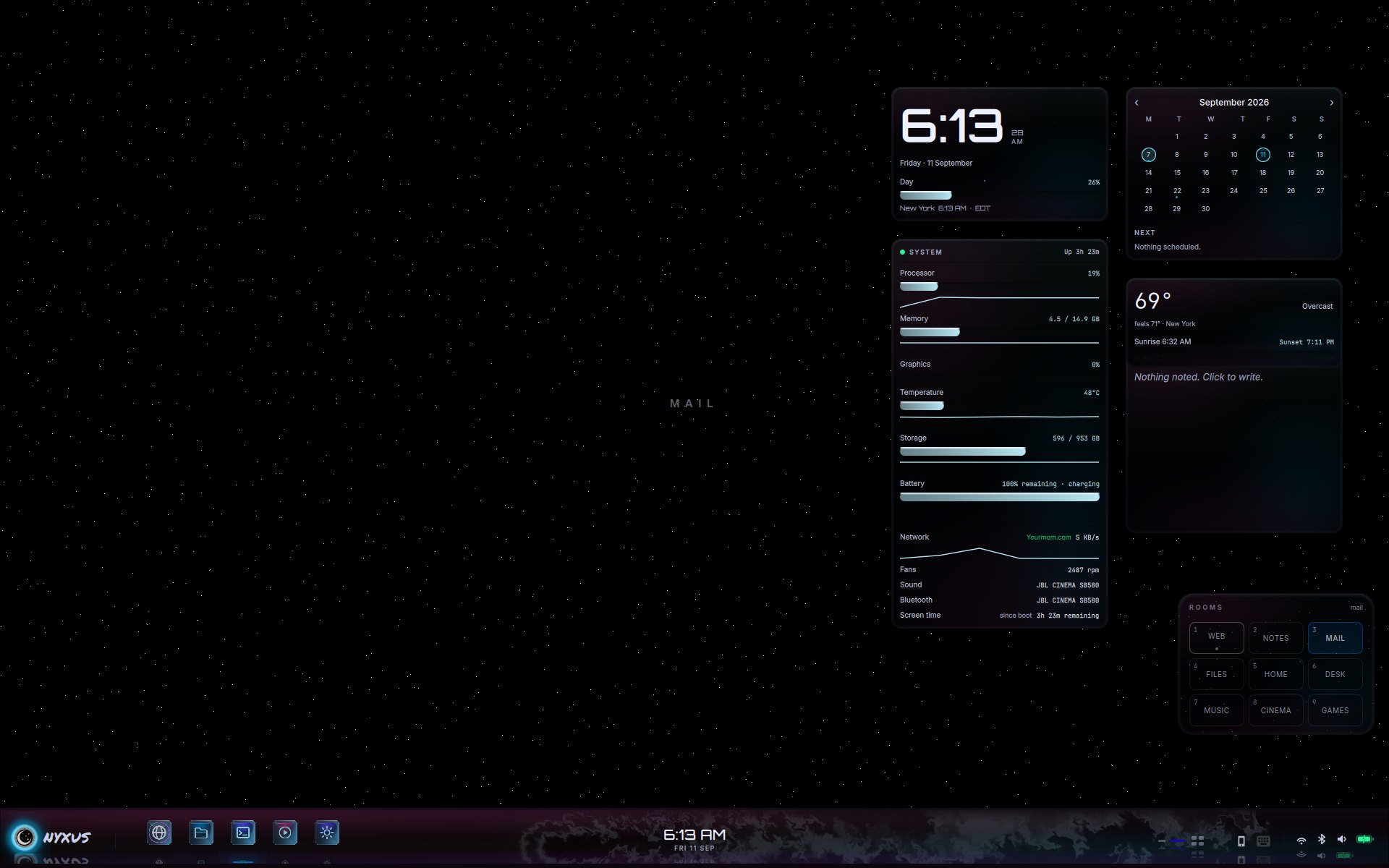
Starlight sky with glass widgets
Sky

Starlight

The ground is a shader, not an image — three lattices of hard points on true black that twinkle by occupancy. It pauses on battery and under fullscreen windows. shaders/headliner.frag

Living paint seam under the bar
Motion

Living paint

The swirl is a real Navier–Stokes fluid on the GPU, not a gradient. Idle it rolls on its own; pointer and beat feed it; hidden it sleeps. Swirl.qml

The spectrum analyser face of the bar
Sound

The beat engine

One process hears the PipeWire sink monitor, predicts the downbeat with a phase-locked loop, and times the spectrum, the swirl, and the window rims to it. Silence is still. Beat.qml

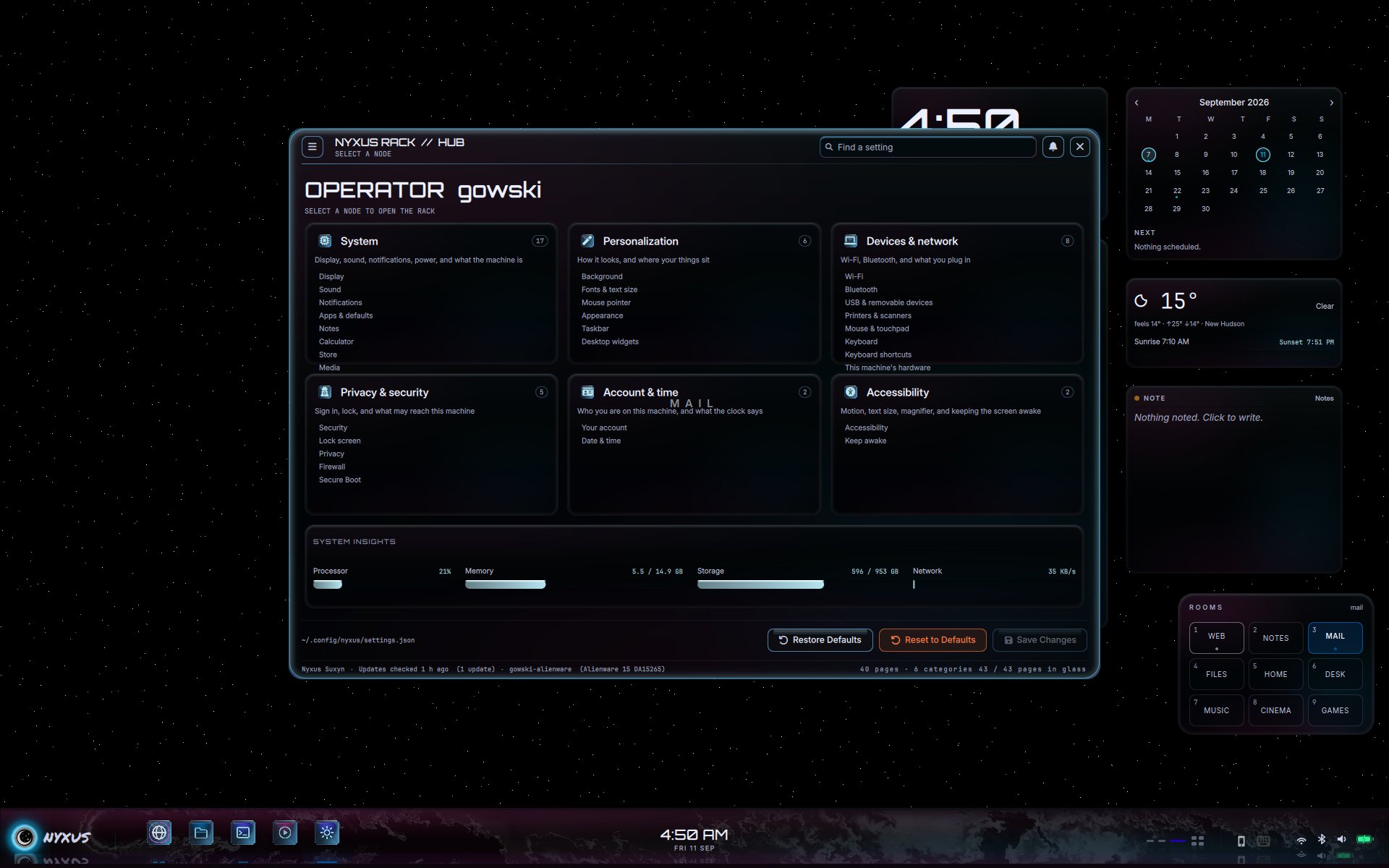
The Settings hub and quick flyout
Control

Settings & flyout

One Settings window — 40 pages of live controls over a catalog — plus a quick flyout for network, Bluetooth, power, and audio. Settings.qml · SidePanel.qml

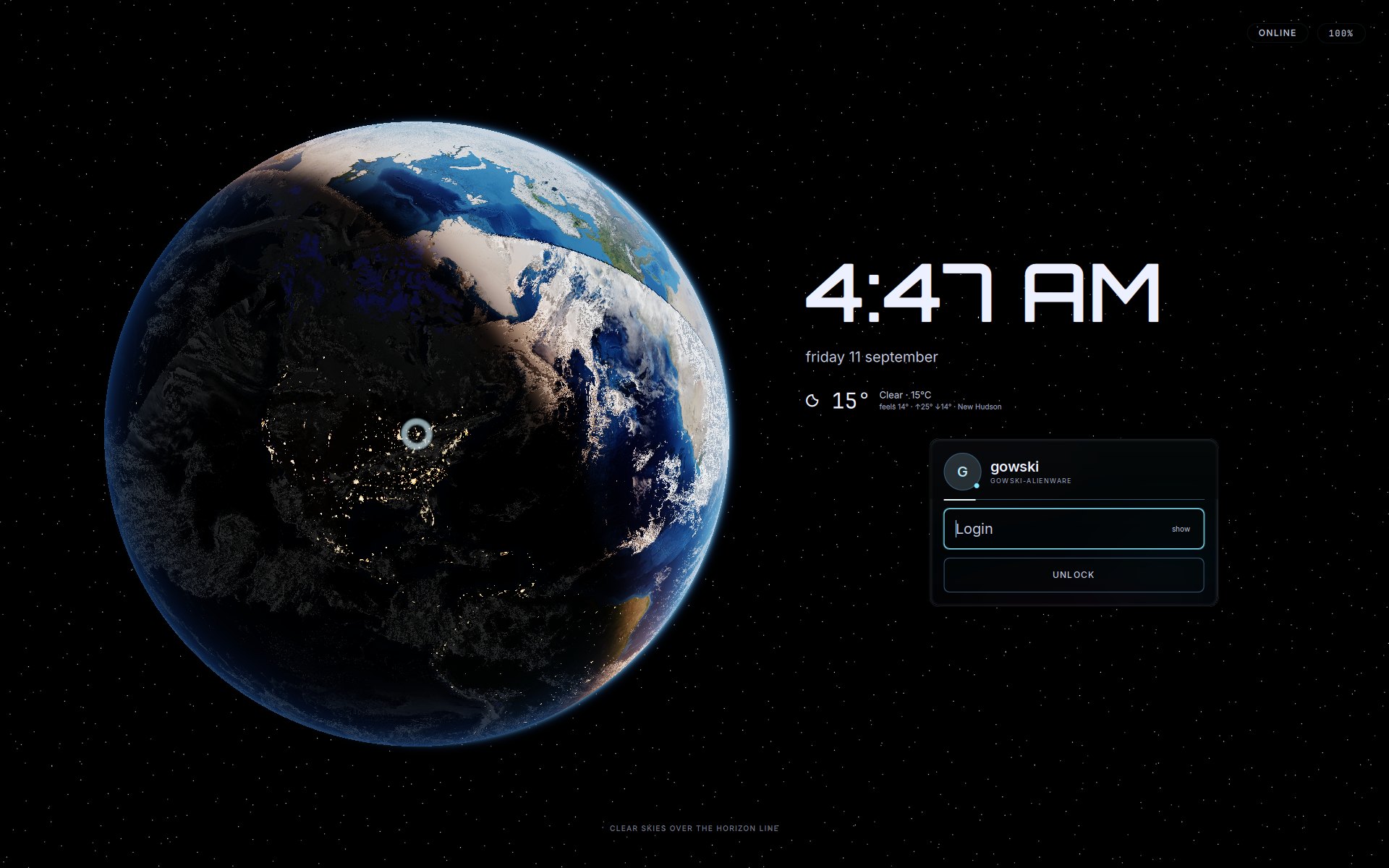
The Earth lock screen with glass unlock card
Session

Lock & login

An Earth shader, time and weather, and a glass unlock card. Super+L, Start, and Power all hit the same PAM-authenticated lock. Lock.qml · hyprlock.conf

What this build is

Nyxus Suxyn is not a GTK skin pack and not a wallpaper dump. It is a desktop shell built out of Quickshell surfaces, Hyprland rules, custom GLSL shaders, and one audio-analysis path that feeds the chrome. The point of this page is to show the main pieces, what each one does, and where the behavior actually lives in the repository.

Compositor layerhypr/ carries monitor rules, binds, layer-shell behavior, hyprlock, hypridle, and the session-level rules the shell expects.
Shell surfacesquickshell/Bar.qml, Launcher.qml, SidePanel.qml, Settings.qml, widgets, media, and lock surfaces are the UI the user actually touches.
Render systemsSwirl.qml is the living paint solver, BarSpectrum.qml is the analyser face, and shaders/headliner.frag is the hard-point sky.
Audio pathnyxus-beat-engine drives predicted beat timing, while Beat.qml and nyxus-beat-tap.sh choose the correct PipeWire monitor source and distribute the result.
Deploy pathdocs/get.sh clones or updates the repo, and tools/apply-shell.sh now runs a pre-flight plus rollback snapshot before replacing shell config.

What ships here. Quickshell chrome, Hyprland config, lock/login visuals, shaders, helper scripts, and the docs/demo page. It is the shell layer of the machine. It is not the ISO builder, not package manifests for every dependency, and not a generic theme meant to fit every desktop unchanged.

The Horizon bar

There is no panel rectangle. The bottom of the screen is a lit seam of living paint. Icons, clock, desks, and vitals sit on that shelf and throw a floor reflection into the swirl.

Bottom bar with NYXUS mark, dock, clock, vitals and reflections

What it is. Top-layer Quickshell window, 84 px exclusive zone, click-through living paint underneath. Magma is reserved for what matters (charging, the no). Glacier ice is chrome, not fill.

How it’s made. Bar.qml owns the structure: exclusive zone, dock, desks, tray, centre clock, right-side vitals, and the flip to the analyser. BarSeam.qml owns the visible paint seam under the glass. Geometry and keep-out spans are derived from live screen and item widths, so the layout scales across other resolutions and multi-monitor setups instead of assuming one fixed 1920×1200 strip.

Starlight

The ground is not a JPEG of stars. It is a shader: three incommensurate lattices of hard points on true black, occupancy-hashed and jittered so they never read as a grid. No bloom, no diffraction spikes — a fibre tip, not a photographed star. Twinkle is occupancy over time, not a halo.

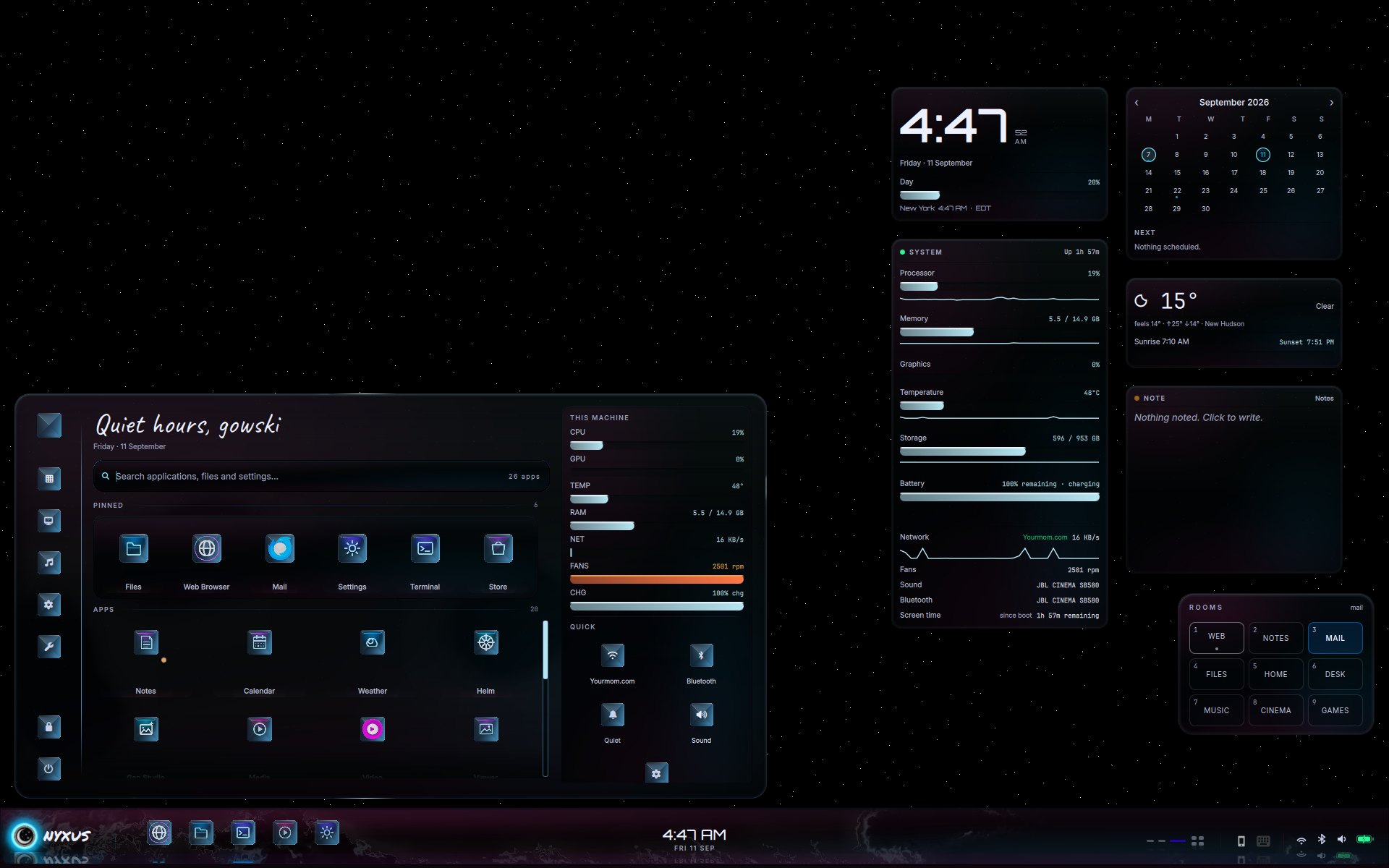
Starlight sky with widgets

How it’s made. shaders/headliner.frag draws the field on a dedicated Quickshell surface. The points are hard, snapped, and sparse by construction — not blurred after the fact. On battery the sky stops twinkling instead of redrawing pointlessly, and when a fullscreen window covers the monitor the effect pauses until the desktop is visible again.

Living paint

The bar’s swirl is not a color wash. It is a fluid. Dye is material in a velocity field. Idle, it rolls and climbs on its own. Pointer and beat can feed it. It is never compositor blur.

How it’s made. Swirl.qml ports a Navier–Stokes chain on the GPU: splat → curl → vorticity → divergence → pressure → advect velocity → advect dye → display. On AC it keeps the full 22-iteration pressure solve; on battery it drops to an eco solve depth and lets idle surfaces sleep. Hosts such as the wallpaper can now tell it when the viewport is covered, so hidden motion stops instead of burning cycles under a fullscreen window.

The analyser

When music is actually on the sink, the bar turns over. The swirl face flips to a spectrum: thin columns, mirrored in the seam, magma at the peaks. Notes ride the same field. Timed lyrics, when a track has them, launch from that same mirror line so the words are in the music, not a sticker on top of it.

How it’s made. One long-lived nyxus-beat-engine: STFT, mel bands, SuperFlux onset, tempo, a phase-locked loop that predicts the downbeat. BarSpectrum.qml is its own shader, not a Swirl. The analyser now reads live keep-out spans from the bar itself, so lyrics and notes stay clear of the dock, clock, tray, and vitals even when those widths change. PipeWire sink monitoring is hardened for default-output switches, mute, pause, and unavailable routes so false beat pulses are zeroed instead of lingering.

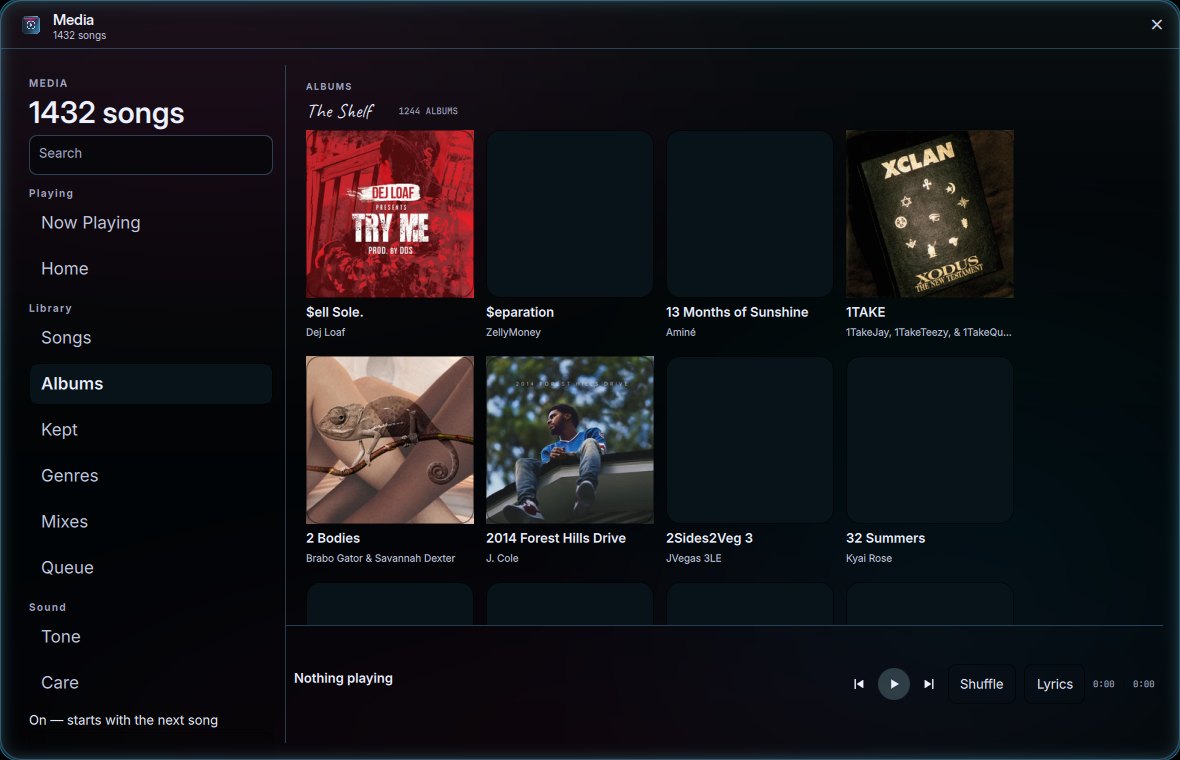
Media

The library is a Nyxus app, not a browser tab. Shelf, albums, keeps, tone. The window rim is the same ice glass as the rest of the chrome — and that rim is piped to the beat engine, so the border pulses on the music, not on a timer.

Nyxus Media app album shelf

How it’s made. Media.qml + a local library. Album art is the file, not a generated square. BorderPulse.qml writes Hyprland’s active border from Beat.kick — predicted, once per beat, falling between hits. Idle is a still glacier ring. No fake pulse with nothing playing.

Start

Quiet hours, this machine, pinned apps, Quick toggles. One glass card — not a full-screen launcher that throws the desktop away.

Start menu over Starlight with widgets still visible

How it’s made. Launcher.qml as a layer-shell surface. Widgets stay on the sky. Search hits apps, files, and Settings pages from one field.

Session lock

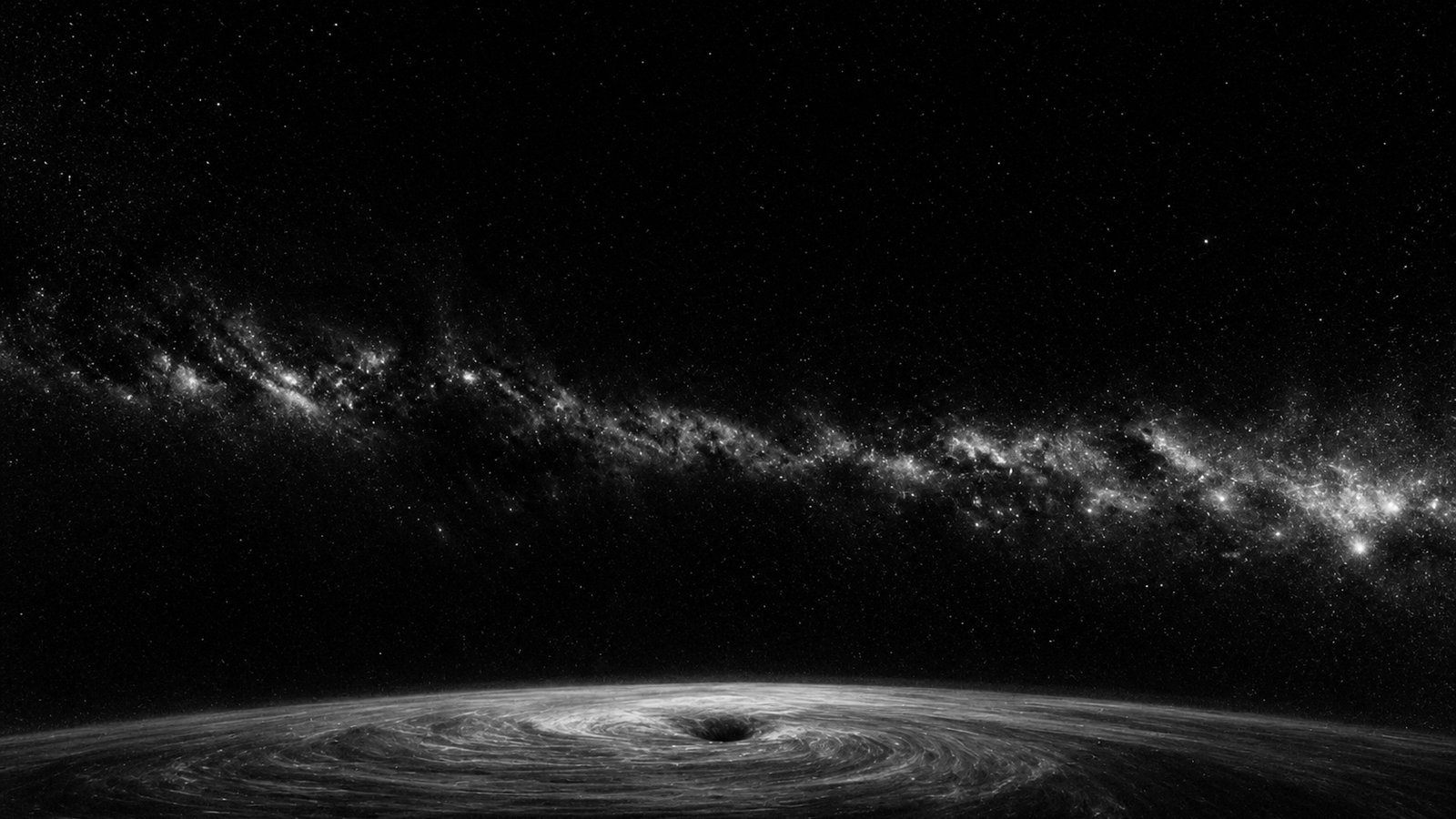
Earth on the left. Time, weather, and a glass login card on the right. Super+L, Start, and the power menu all hit the same lock — not a second greeter.

Earth lock screen with glass unlock card

Session lock. Earth shader, time, weather, glass card. Super+L. The card is furniture glass. Magma is the no.

Login still — vortex Earth

Login still. The same vortex Earth the machine uses at the front door.

Settings, flyout, widgets

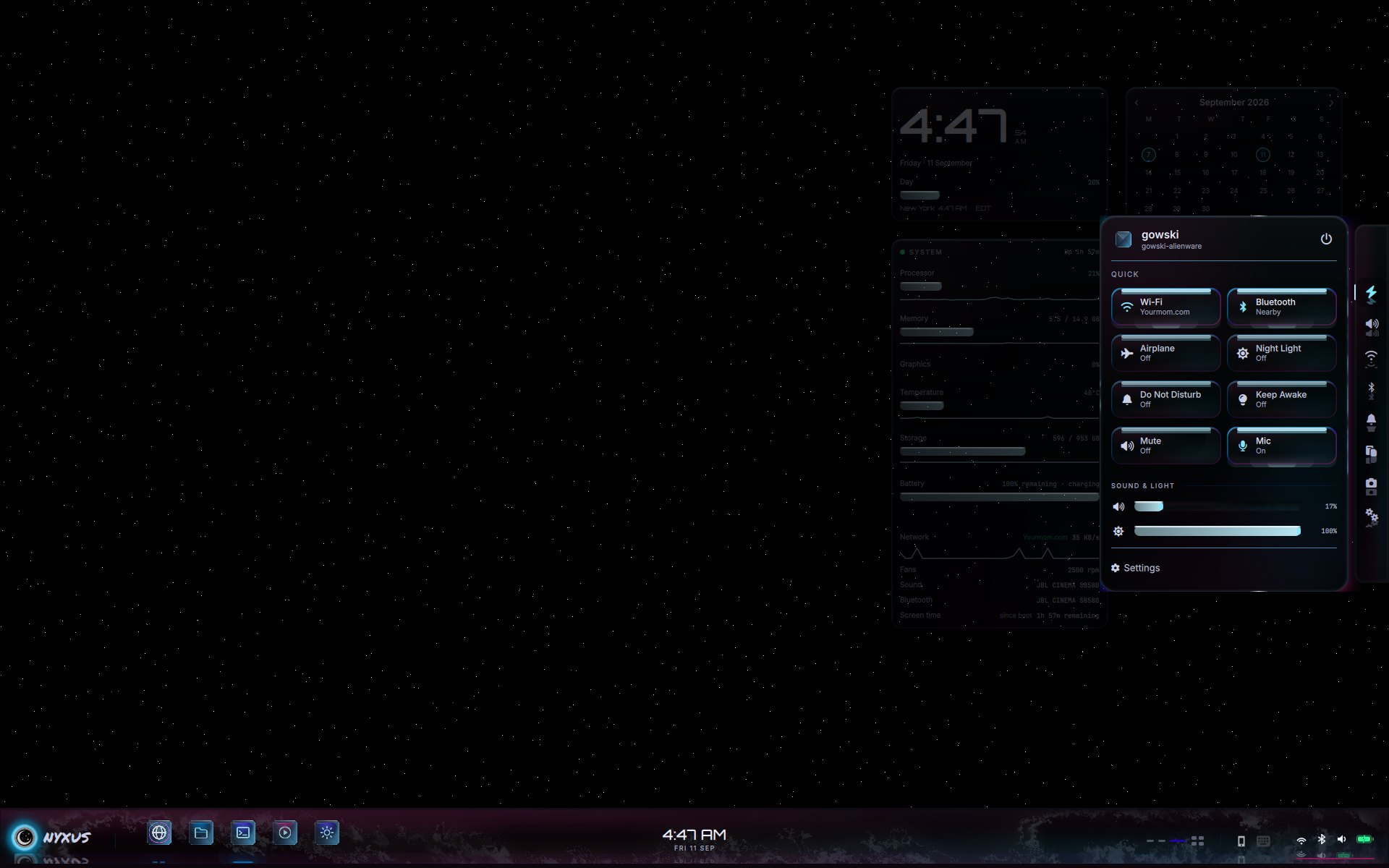
One Settings window. Tree on the left, the page on the right. The old diagnostic log column is gone so the page can breathe. The flyout is Quick, Sound, Network, Bluetooth, and the rest of the rail — nearby Wi-Fi and BT lists, not just radio toggles.

Nyxus Rack Settings hub

Settings. Settings.qml — FloatingWindow, catalog pages, live controls. 40 pages in glass.

Quick flyout with Wi-Fi, Bluetooth, Night Light

Flyout. SidePanel.qml. Night Light, DND, Airplane, Keep Awake, Mute, Mic. Join a network from the list.

A pass across the desktop

A longer pass on this machine: Starlight, Start, flyout, Settings, Notes, Media, then a terminal that states the build. Empty workspace. No compositor blur.

Get it

From a terminal, on a machine that already has git:

curl -fsSL https://ikswognereisj-ctrl.github.io/Nyxus-Suxyn/get.sh | bash

That clones the desktop (Quickshell, Hyprland, walls) into ~/src/Nyxus-Suxyn. It does not flash a full OS. The complete system is still the Nyxus Suxyn ISO; the installer slideshow and Calamares theme in this repo go on the next bake.

Then, if you want this chrome on the current user (it backs up first):

~/src/Nyxus-Suxyn/tools/apply-shell.sh

Pre-flight. Before deploy, the repo now checks for GPU/driver expectations, Hyprland + Quickshell presence, PipeWire/WirePlumber, audio-monitor tools, and monitor geometry versus the 1920×1200 baseline the original layout was tuned on. You can run that alone with tools/apply-shell.sh --preflight-only.

What a target machine should already have. Hyprland, Quickshell, PipeWire, WirePlumber, and the usual desktop helpers such as hyprctl, wpctl, pactl, playerctl, and cava. The deploy script does not install a distro for you; it replaces the shell config on a machine that already has the stack.

Update it

The shell is updatable from the terminal at any time. One command pulls the latest commit and re-runs the deploy — pre-flight checks and a fresh rollback snapshot included. Local edits in the clone are never discarded: a dirty tree stops the pull and is reported instead.

~/src/Nyxus-Suxyn/tools/update-shell.sh

Check first, change nothing. tools/update-shell.sh --check reports how far behind the clone is and exits. Re-running the get.sh one-liner from the section above also fast-forwards an existing clone without deploying.

Rollback. Every deploy snapshots the previous ~/.config/quickshell and ~/.config/hypr to ~/.local/share/nyxus/shell-bak-<timestamp>/ with a RESTORE.txt beside them. Restoring is copying the snapshot back over ~/.config — the exact commands are written into that file at deploy time.

How it works

The whole desktop is one data flow. Sound and input come in at the bottom; everything you see is a reaction to it. Here is the path a single beat of music actually travels.

01
PipeWire plays audio.

The desktop's sound server runs the sink. Nothing in the shell touches the audio device directly.

02
nyxus-beat-tap.sh picks the right monitor.

It follows the default sink's monitor source, so the analysis tracks whatever output is actually live — and goes quiet on mute, pause, or an unavailable route instead of guessing.

03
nyxus-beat-engine analyzes it.

STFT → mel bands → SuperFlux onset detection → autocorrelation tempo → a phase-locked loop that predicts the downbeat ahead of the hit, so reactions land on time instead of chasing it.

04
Beat.qml broadcasts it.

One Quickshell singleton turns the engine's output into timing + spectrum data the rest of the shell can bind to.

05
The surfaces react.

BarSpectrum.qml flips the bar into columns, Swirl.qml feeds bass/mid/high and the predicted kick into the fluid, and BorderPulse.qml rewrites Hyprland's active border once per beat. No real audio → no fake pulse.

The layers, top to bottom

Quickshell surfaces live on explicit Wayland layer-shell tiers, so the sky, the widgets, the bar, and the lock never fight over the same pixel.

OverlayLock & screensaver (Lock.qml, Screensaver.qml) — above everything, the only tier that authenticates.
TopThe Horizon bar (Bar.qml) and the flyout (SidePanel.qml) — the chrome you touch.
BottomWidgets (Widgets.qml) and the sky (Headliner.qml / Starlight3D.qml) — they sit in the scene, behind windows.
BackgroundThe still wallpaper (LiveWall.qml + awww) — the floor everything else floats over.

Why it holds together. shell.qml instantiates the surfaces; Theme.qml is the single token source so no component writes a raw hex; and the compositor itself (hypr/hyprland.conf + the conf.d/ shards) carries the window rules, keybinds, and idle/lock pipeline the shell assumes.

Keybind cheat-sheet

The chords that drive the desktop, straight from hypr/hyprland.conf and the conf.d/ shards. Super is the modifier ($mod).

Launch & shell
SuperEnterTerminal (ghostty)
SuperSpaceStart / launcher
SuperA / NQuick flyout
SuperXPower menu
SuperTabTask view
Super.Emoji picker
SuperBBrowser
SuperEFiles
Windows
SuperQClose window
AltF4Close window
AltTabCycle windows
SuperFFullscreen
SuperShiftVToggle floating
Super + Snap to halves
SuperAlt + arrowsMove focus
SuperAltShift + arrowsMove window
Workspaces & rooms
Super10Go to workspace 1–10
SuperShift10Move window to workspace
SuperSToggle scratchpad
CtrlAlt + arrowsWalk between rooms
SuperAltMStation map
Super + scrollNext / previous workspace
Session & capture
SuperLLock
CtrlAltDelPower menu
CtrlShiftEscSystem monitor
PrtScScreenshot (fullscreen)
ShiftPrtScScreenshot (region)
AltPrtScScreenshot (window)
Volume / play keysVolume, mute, play-pause

In-session, Super/ opens a searchable cheatsheet (~/.config/rofi/cheatsheet.sh).

Questions

The short answers to what people actually ask.

Is this a distro or an ISO I can flash?
No. This repository is the shell layer — Quickshell chrome, Hyprland config, shaders, and scripts. It does not build or ship an operating system. The full system is a separate Nyxus Suxyn image; only the Calamares branding for it lives here (in installer/).
Will it work on my machine?
It is tuned for one Alienware 15 (1920×1200 @ 165 Hz). Machine-specific values ship commented out with generic fallbacks, so it will run elsewhere, but it is opinionated. The supported path is to fork it and adapt it — DEPENDENCIES.md lists the expected stack and tools/apply-shell.sh --preflight-only checks a machine against it before anything changes.
How do I install it from a terminal?
curl -fsSL https://ikswognereisj-ctrl.github.io/Nyxus-Suxyn/get.sh | bash clones it to ~/src/Nyxus-Suxyn and pre-flights the machine. Then ~/src/Nyxus-Suxyn/tools/apply-shell.sh deploys it, after taking a timestamped backup.
How do I update it later?
~/src/Nyxus-Suxyn/tools/update-shell.sh pulls the latest commit (fast-forward only — your local edits are never discarded) and re-runs the deploy with a fresh rollback snapshot. Use --check to see how far behind you are without changing anything.
What happens if an update breaks something?
Every deploy snapshots your previous ~/.config/quickshell and ~/.config/hypr to ~/.local/share/nyxus/shell-bak-<timestamp>/ with a RESTORE.txt beside them. Rolling back is copying that snapshot back — the exact commands are written into the file at deploy time.
Does it collect or send any data?
No. The only network calls in the shell are to the hardcoded Open-Meteo weather APIs, and only if you turn weather on. Locking authenticates locally through PAM; no credentials are stored, logged, or transmitted.

How this build is put together

This is not a tinted GTK theme. Every surface is a material with a shader behind it. The palette is not a list of hex codes to fill rectangles — it is emission ladders sampled from nebula photographs, then used as thickness, etch, and dye.

StarlightBottom-layer shader. Three lattices, hard points, true black gaps. Not a wallpaper file with a bloom filter.
HorizonTop bar + click-through seam. Exclusive zone 84 px. Living paint under glass, not a panel bitmap.
WidgetsClock, system, calendar, weather, notes, rooms. Same glass language as Start. They sit in the sky, not in the bar.
LockEarth shader + glass card. Super+L, Start, and Power all call the same lock. PAM through hyprlock.
BeatOne engine. Predicted downbeat. Spectrum, swirl, and window rims listen. Silence is still.

Main runtime pieces

shell.qml instantiates the per-screen surfaces. Bar.qml is the permanent chrome. Launcher.qml, SidePanel.qml, and Settings.qml are the main interactive panels. Beat.qml is the singleton that turns audio into timing and spectrum data. Theme.qml is the token source, and shaders/*.frag are the render back-ends compiled to .qsb for Qt.

Runtime rules this build follows

Real motion must be honest about cost. Hidden or covered surfaces pause. Battery mode scales motion down instead of pretending nothing changed. Audio reactions follow the actual sink monitor, not metadata alone. The shell uses compositor layers and item geometry as first-class structure, so bars, widgets, wallpaper, and lock surfaces do not fight each other for the same pixel.

Glass is furniture

Panels, Start, Settings, flyout: Pane + swell + a 1 px glacier seam. The body is empty. You see the sky through smoked glass that bends. Hyprland’s blur stays at zero so the type never goes soft. A compositor blur would have been the easy way. It was rejected because it turns the whole desktop into vaseline.

Crystal is identity

Dock gems are not icons on a plate. ocular_crystal.frag ray-marches a 3-D signed distance field baked from the mark. The SDF packs silhouette in R and 16-bit dome height in GB so the normals do not band into rings. Alpha is pinned to 255 — Qt premultiplies, and an earlier pack in A silently destroyed the field. The glyph is laser-etched in the stone: points of light in ice, never a PNG glued on top.

The palette is layers

Each accent is a five-band emission ladder (haze / deep / body / accent / glow) measured off nebula stills — 197k pixels, four banners. Grounds sit at #000000–#000007. Saturation stays 0.79–0.86 into the darks. Magma (#ff7847) is the only hot corner, and it is reserved for what matters: charging, the no, a peak on the analyser. glacier[0] teal is banned as a fill. Nothing in the shell writes a raw hex; tokens live in one file so a banned color cannot hide in an icon.

Swirl is a fluid, not a gradient

The solver is a real Navier–Stokes chain on the GPU, ported pass-for-pass from a reference that had filaments and voids. An earlier curl-noise “port” produced smooth bands with nothing for dye to pile against. Pressure is solved 22 iterations a frame. Idle, stirrers roll and climb so the field does not only slide. When music is on, bass/mid/high and a predicted kick feed the same tank. When music is off, the field does not fake a pulse.

Beat is predicted, not guessed

One process, nyxus-beat-engine, hears the sink monitor. STFT 2048/512, mel bands, SuperFlux onset, autocorrelation tempo, phase-locked loop. It knows the downbeat ahead of the hit so rims, swirl, and spectrum land on time. BorderPulse.qml rewrites Hyprland’s active border from that kick — once per beat, falling between hits. Idle is a still glacier ring. A paused player’s metadata is not a beat.

The analyser is a second face

The bar does not overlay bars on the swirl. It turns over — a FlipPlate — after ~900 ms of real sink audio. BarSpectrum.qml is its own shader: hundreds of thin columns, mirrored in the seam, magma holds on the peaks. Keep-out rectangles so the field never runs through dock, clock, or vitals. Timed lyrics, when an LRC exists, launch from that same mirror line.

BuildNyxus Suxyn · 2026.09.02
MachineAlienware 15 · 1920×1200 @ 165 Hz
CompositorHyprland 0.56.2 · blur off
ShellQuickshell 0.3.1
SkyStarlight shader · six stills in Settings
LockEarth glass card · Super+L
Audionyxus-beat-engine + PipeWire monitor routing
Deploydocs/get.sh clone/update + tools/apply-shell.sh pre-flight and rollback snapshot

Scope & disclaimer

Nyxus Suxyn is built for one machine, on purpose. It is a personal build shared as-is under the MIT license — a showcase and dotfiles source, not a distribution, ISO, or drop-in theme. Layouts, keybinds, and the audio pipeline are opinions, and those opinions are this laptop's. Where a value is machine-specific it ships commented out with a generic fallback.

Nothing here installs an operating system or modifies the boot chain. The deploy replaces user-level shell configuration on a machine that already runs the stack, after taking a backup. Review a script before running it with curl | bash — that advice applies to every project, including this one.

Fork to adaptWant it on your own hardware? Fork it. DEPENDENCIES.md lists the expected stack; tools/apply-shell.sh --preflight-only checks a machine against it.
SecurityLocking authenticates through PAM; no credentials are stored or transmitted. Report vulnerabilities privately per SECURITY.md, not in a public issue.
Not in this repoISO builder, other machines, personal apps, local AI, and security-stack tools.